Kinaxis KX3-003 - Certified RapidResponse Author Level 3 Certification Exam
Question #1 (Topic: Demo Questions)
You are asked to restrict a worksheet so that users can only see data for the demand of the countries
that they should have permission to see. A field has been added to the IndependentDemand table, which
is a reference to a custom table called Country. Each user may have permission to see the demands
from one or more countries, and each country can be seen by one or more users. They should be able to
see data from multiple countries in the worksheet at the same time.
In this scenario, what should you do to enable this capability?
see data from multiple countries in the worksheet at the same time.
In this scenario, what should you do to enable this capability?
Correct Answer: D
Explanation:
This setup allows for flexible data visibility based on user permissions. By creating a profile variable that
contains the allowed countries for each user, you can then apply a filter expression to the worksheet that
evaluates this variable. If a user is permitted to see all countries (indicated by an asterisk '*'), the
expression returns TRUE, otherwise, it checks if the demand's country is in the user's permitted list.
References:
Kinaxis RapidResponse documentation on configuring data visibility through profile variables and
worksheet filters.
Kinaxis training materials on setting up user permissions and responsibility definitions.
Question #2 (Topic: Demo Questions)
You are creating an insert definition to insert records using a crosstab worksheet, which contains weekly buckets that begin on Monday. You want the inserted records to be due on Friday of that week but if Friday is a non-workday, you want the inserted record to be due on Thursday.
In this situation, how would you set the bucket date in the insert definition?
Correct Answer: C
Explanation:
When setting the bucket date in an insert definition, if the requirement is to have the record due on the last workday of the week (which is Friday or Thursday if Friday is a non-workday), then the correct approach is to configure the insert definition to use the last workday in the bucket. This will ensure that the due date falls on the correct day according to the specified requirement.
When setting the bucket date in an insert definition, if the requirement is to have the record due on the last workday of the week (which is Friday or Thursday if Friday is a non-workday), then the correct approach is to configure the insert definition to use the last workday in the bucket. This will ensure that the due date falls on the correct day according to the specified requirement.
References The Kinaxis Rapid Response documentation details how to use bucket dates and adjust them according to workdays in the insert definition setup for crosstab worksheets.
Question #3 (Topic: Demo Questions)
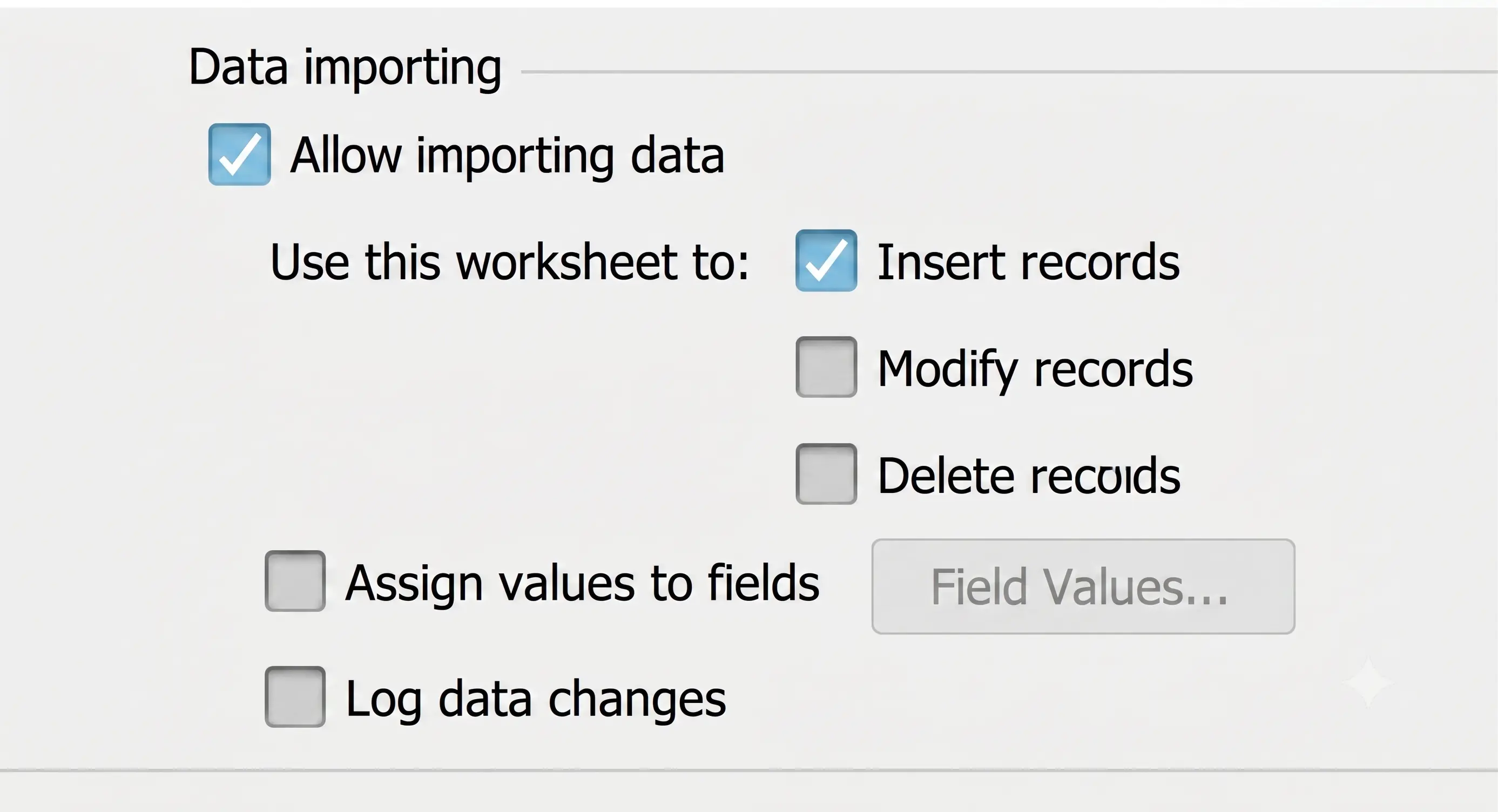
Given the worksheet properties shown in the exhibit, which console output would exist for the following script?
var dataForInsert = [['1','BBy-LCD37','DC-Europe','DCRequest','LCD-3735','DC-Europe','06-01-20',147]];
var wbOrderChng = rapidResponse.workbooks.get({name:'Change Orders',scope:'Private'}, {scenarios: [scenario], filter: {name: 'All Parts', scope: 'Public'}, siteGroup: {name: site, scope: 'Public'}});
var wsOrderChng = wbOrderChng.worksheets.get('ChangeOrders');
var importResult = wsOrderChng.importData(dataForInsert); rapidResponse.console.writeLine(JSON.stringify(importResult));
Correct Answer: A
Explanation:
The script is performing a data import operation into a worksheet that is configured to allow importing data for the purpose of inserting records, as shown in the worksheet properties exhibit. The JSON object in the console output would reflect the result of this import operation. The object details the number of records deleted, modified, and inserted. Since the worksheet is set up only to allow insertion, and the script is importing data for insertion, the "inserted" key would have a value of 1, and "deleted" and "modified" would have a value of 0, indicating a successful insert without any deletions or modifications.
The script is performing a data import operation into a worksheet that is configured to allow importing data for the purpose of inserting records, as shown in the worksheet properties exhibit. The JSON object in the console output would reflect the result of this import operation. The object details the number of records deleted, modified, and inserted. Since the worksheet is set up only to allow insertion, and the script is importing data for insertion, the "inserted" key would have a value of 1, and "deleted" and "modified" would have a value of 0, indicating a successful insert without any deletions or modifications.
References Kinaxis Rapid Response documentation for data importing and console operations would support this behavior, outlining how the import Data method interacts with worksheet configurations.
Question #4 (Topic: Demo Questions)
You have a new demand for 800 units of a product. SourceRule.AllotmentRule for this part is set to OnGoing.
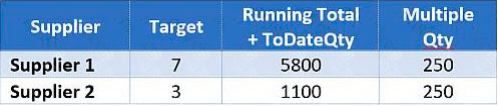
Referring to the graphic, which planned order results will be created to satisfy this demand?
Correct Answer: A
Explanation:
Referring to the graphic, it appears that there is a target allocation ratio between Supplier 1 and Supplier
Referring to the graphic, it appears that there is a target allocation ratio between Supplier 1 and Supplier
2 (not visible in the image, but this can be inferred from the allocation quantities). When a new demand
for 800 units is introduced, the SourceRule.AllotmentRule set to OnGoing will distribute the demand
based on the ongoing target ratio. Since Supplier 1 has a running total that far exceeds Supplier 2, and
both have a 'Multiple Qty' of 250, the next allotment will attempt to balance the ongoing total closer to the
target ratio. It's likely that the new demand will be allocated by filling up to the nearest multiple of 250
that does not exceed the demand. Therefore, Supplier 1 gets 250, and the remaining 550 units would go
to Supplier 2. Since Supplier 2 also must supply in multiples of 250, it rounds up to 750 units.
ReferencesThis understanding is derived from the Kinaxis RapidResponse concepts for managing
supply allocations and the behavior of ongoing rules as described in the Kinaxis RapidResponse
documentation.
References:
The Kinaxis RapidResponse documentation on SourceRule.AllotmentRule indicates that ongoing
allotment is based on the target ratios set for suppliers1.
The Certified RapidResponse Author Level 3 materials cover the configuration and implications of
SourceRule. AllotmentRule settings2.
Question #5 (Topic: Demo Questions)
You need to create a new custom field to be used for record filtering that will be populated with the salesperson's name. Each order will have a single associated salesperson's name.
Following database design principles and Kinaxis best practices, which action accomplishes this task?
Correct Answer: B
Explanation: