Microsoft AB-730 - AI Business Professional (beta) Certification Exam
Question #1 (Topic: demo questions)
HOTSPOT
Select the answer that correctly completes the sentence.
A.
Correct Answer: A
Explanation:
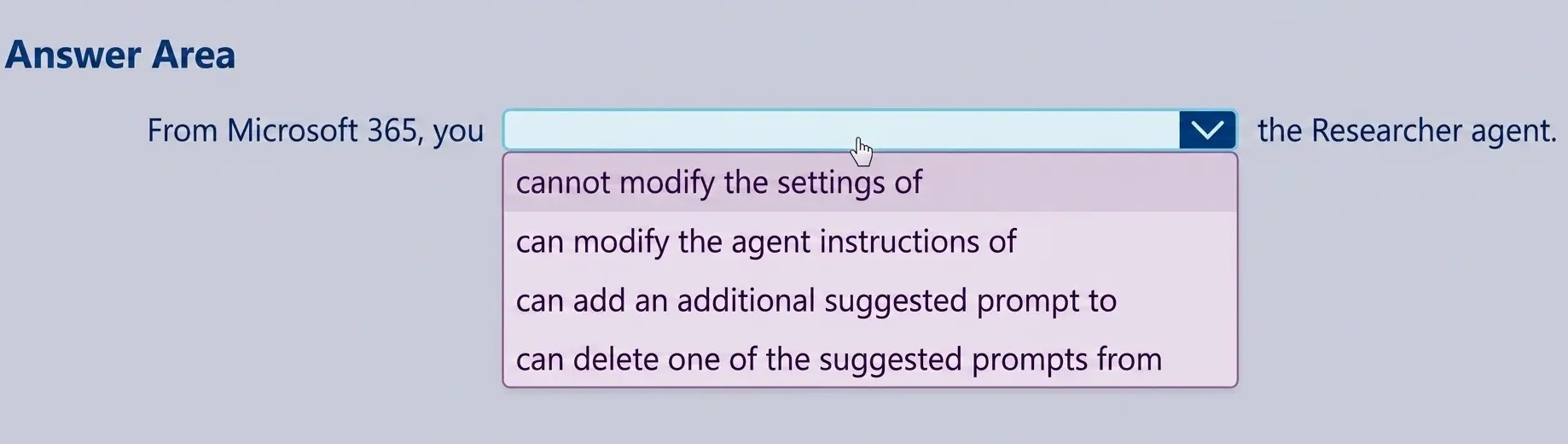
The correct completion is “cannot modify the settings of” because built-in agents such as the Researcher agent in Microsoft 365 Copilot are system-defined experiences. These agents are designed and managed by Microsoft to ensure consistent functionality, security, compliance, and alignment with responsible AI standards. While users can interact with Researcher, provide prompts, and refine outputs during conversations, they cannot directly modify the core system settings or configuration of the built-in agent from Microsoft 365. Administrative configuration and deeper customization are available when creating custom Copilot agents through approved development tools, but default Microsoft-provided agents have controlled configurations. Options such as modifying agent instructions, adding prompts, or deleting suggested prompts imply direct structural customization of the built-in agent interface, which is not supported in the standard Microsoft 365 Copilot experience. This reflects a key generative AI governance principle in enterprise environments: system-level controls remain centrally managed to maintain data protection, compliance, and responsible AI implementation across the organization.
Question #2 (Topic: demo questions)
You use Microsoft 365 Copilot. You discover that you had a conversation that used a knowledge source that contains confidential information. You need to delete the conversation data without requiring administrative approval. You must retain your other conversations, if possible. What should you use?
Correct Answer: D
Explanation:
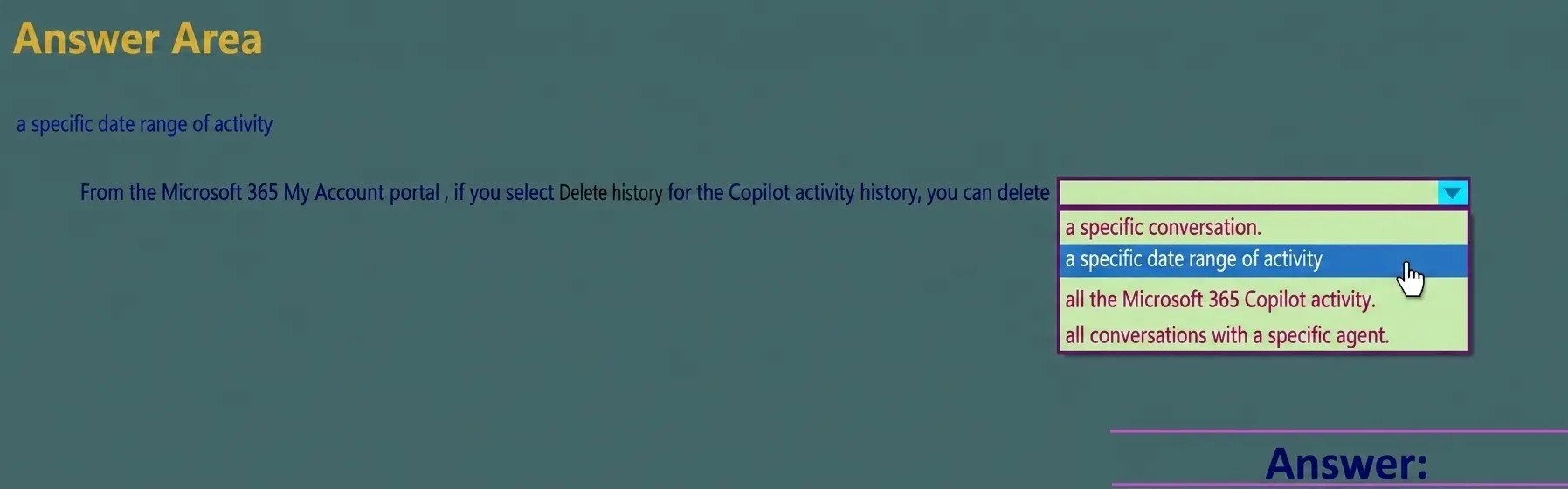
Microsoft 365 Copilot follows Microsoft’s enterprise data governance and privacy principles, which allow users to manage their own conversation history where appropriate. According to Microsoft AI Business Professional guidance, users can review and delete individual Copilot conversation histories directly from their personal account settings without requiring administrative intervention. Option D is correct because the My Account portal in Microsoft 365 Copilot allows individual users to manage their activity history, including deleting specific conversations. This enables targeted removal of sensitive interactions while retaining other conversation data. Option A is incorrect because the Copilot app itself does not provide full account-level activity management capabilities. Options B and C are administrative tools used for tenant-wide governance, compliance, retention policies, and eDiscovery. These portals typically require administrative privileges and are not intended for individual user self-service deletion of specific conversations. Therefore, to delete a single confidential Copilot conversation without affecting other chats and without requiring administrator approval, the correct tool is the My Account portal in Microsoft 365 Copilot.
Question #3 (Topic: demo questions)
You are creating a prompt in Microsoft 365 Copilot to get information about a proposal. You need to ensure that the response is grounded in the proposal's information. What is the best approach to achieve the goal? More than one answer choice may achieve the goal.
Correct Answer: C
Explanation:
According to Microsoft AI Business Professional guidance for Microsoft 365 Copilot, grounding a response means ensuring the AI generates output based on specific, authoritative content rather than relying on generalized training data. When working with enterprise documents such as proposals, grounding is achieved by explicitly referencing the source material within the prompt. Option C is correct because referencing the proposal content directs Copilot to use that specific document as the primary context for generating the response. Microsoft documentation emphasizes that effective prompts should include clear context and explicit references to relevant files, meetings, emails, or documents stored in Microsoft 365. This reduces hallucinations and ensures factual alignment with organizational data. Option A is incorrect because relying on training data increases the risk of inaccurate or fabricated information. Options B and D improve prompt clarity but do not guarantee grounding in the proposal itself. Therefore, explicitly referencing the proposal content is the most reliable and best practice method for ensuring grounded, accurate responses in Microsoft 365 Copilot.
Question #4 (Topic: demo questions)
HOTSPOT
For each of the following statements, select Yes if the statement is true. Otherwise, select No. NOTE: Each correct selection is worth one point.
A.
Correct Answer: A
Explanation:
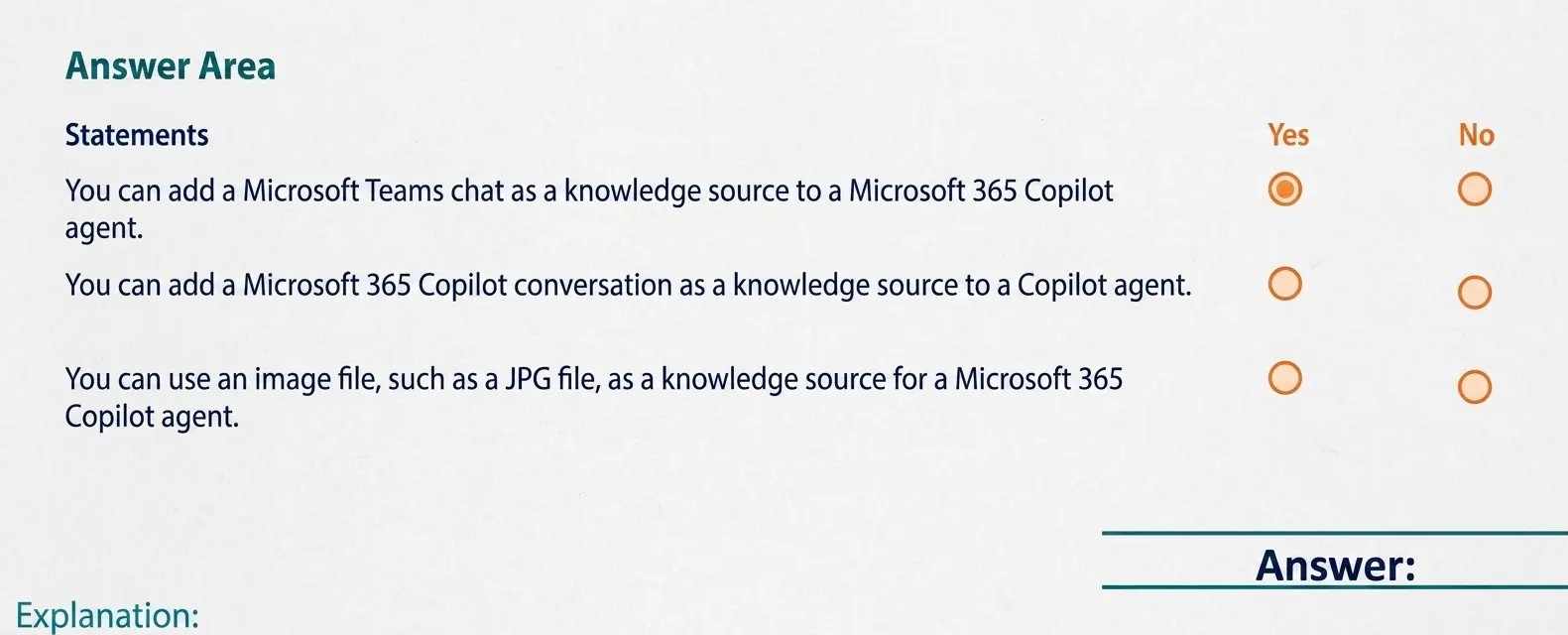
Statements: Answer: You can add a Microsoft Teams chat as a knowledge source to a Microsoft 365 Copilot agent. Answe r: Yes You can add a Microsoft 365 Copilot conversation as a knowledge source to a Copilot agent. Answe r: No You can use an image file, such as a JPG file, as a knowledge source for a Microsoft 365 Copilot agent. Answe r: NO Microsoft 365 Copilot Agent Builder supports grounding agents in approved knowledge sources so responses are accurate and permission-trimmed. Teams chats can be used as a knowledge source: Microsoft Learn confirms you can ground an agent in Teams data, including chat messages (and optionally scope to specific chats), enabling the agent to reference collaboration context when answering questions. A Copilot conversation itself is not a supported “knowledge source” option; knowledge sources are configured from items like SharePoint content, Teams, email, websites, uploaded files, and connectors—not prior chat transcripts. Finally, JPG images are not supported as knowledge-source file types. Microsoft’s supported file types for agent knowledge include documents like .doc/.docx, .pdf, .ppt/.pptx, .txt, and Excel formats (.xls/.xlsx), but not image formats. Therefore, you cannot use a JPG as a knowledge source for a Copilot agent.
Question #5 (Topic: demo questions)
HOTSPOT
Select the answer that correctly completes the sentence.
A.
Correct Answer: A
Explanation: