
Red Hat Certified Engineer (RHCE) exam for Red Hat Enterprise Linux 8 Exam EX294 Exam Questions
Create a playbook /home/bob /ansible/motd.yml that runs on all inventory hosts and docs the following: The playbook should replaee any existing content of/etc/motd in the following text. Use ansible facts to display the FQDN of each host
On hosts in the dev host group the line should be " Welcome to Dev Server FQDN " .
On hosts in the webserver host group the line should be " Welcome to Apache Server FQDN " .
On hosts in the database host group the line should be " Welcome to MySQL Server FQDN " .
Answer
See the Explanation for complete Solution below.
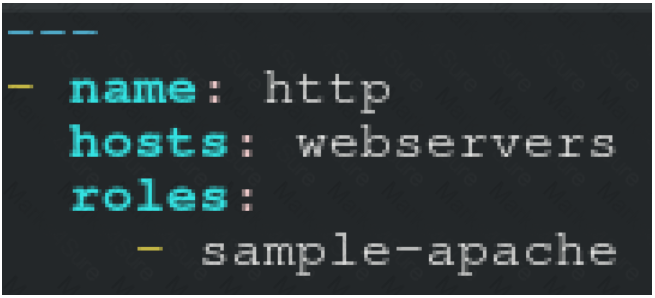
/home/sandy/ansible/roles/sample-apache/tasks/main.yml
Install the RHEL system roles package and create a playbook called timesync.yml that:
-- > Runs over all managed hosts.
-- > Uses the timesync role.
-- > Configures the role to use the time server 192.168.10.254 ( Hear in redhat lab
use " classroom.example.com " )
-- > Configures the role to set the iburst parameter as enabled.
Answer
See the Explanation for complete Solution below.
Solution as:
# pwd
home/admin/ansible/
# sudo yum install rhel-system-roles.noarch -y
# cd roles/
# ansible-galaxy list
# cp -r /usr/share/ansible/roles/rhelsystem-roles.timesync .
# vim timesync.yml
---
- name: timesynchronization
hosts: all
vars:
timesync_ntp_provider: chrony
timesync_ntp_servers:
- hostname: classroom.example.com _ in exam its ip-address
iburst: yes
timezone: Asia/Kolkata
roles:
- rhel-system-roles.timesync
tasks:
- name: set timezone
timezone:
name: " {{ timezone }} "
wq!
timedatectl list-timezones | grep india
# ansible-playbook timesync.yml --syntax-check
# ansible-playbook timesync.yml
# ansible all -m shell -a ' chronyc sources -v '
# ansible all -m shell -a ' timedatectl '
# ansible all -m shell -a ' systemctl is-enabled chronyd '
Modify file content.
------------------------
Create a playbook called /home/admin/ansible/modify.yml as follows:
* The playbook runs on all inventory hosts
* The playbook replaces the contents of /etc/issue with a single line of text as
follows:
-- > On hosts in the dev host group, the line reads: “Development”
-- > On hosts in the test host group, the line reads: “Test”
-- > On hosts in the prod host group, the line reads: “Production”
Answer
See the Explanation for complete Solution below.
Solution as:
# pwd
/home/admin/ansible
# vim modify.yml
---
- name:
hosts: all
tasks:
- name:
copy:
content: " Development "
dest: /etc/issue
when: inventory_hostname in groups[ ' dev ' ]
- name:
copy:
content: " Test "
dest: /etc/issue
when: inventory_hostname in groups[ ' test ' ]
- name:
copy:
content: " Production "
dest: /etc/issue
when: inventory_hostname in groups[ ' prod ' ]
wq
# ansible-playbook modify.yml –-syntax-check
# ansible-playbook modify.yml
Create an Ansible vault to store user passwords as follows:
* The name of the vault is valut.yml
* The vault contains two variables as follows:
- dev_pass with value wakennym
- mgr_pass with value rocky
* The password to encrypt and decrypt the vault is atenorth
* The password is stored in the file /home/admin/ansible/password.txt
Answer
See the Explanation for complete Solution below.
Solution as:
# pwd
/home/admin/ansible
# echo " atenorth " > password.txt
# chmod 0600 password.txt
# ansible-vault create vault.yml --vault-password-file=password.txt
---
- dev_pass: wakennym
- mgr_pass: rocky
wq
# cat vault.yml
$ANSIBLE_VAULT;1.1;AES256
36383862376164316436353665343765643331393433373564613762666531313034336438353662
3464346331346461306337633632393563643531376139610a343531326130663266613533633562
38623439316631306463623761343939373263333134353264333834353264343934373765643737
3535303630626666370a643663366634383863393338616661666632353139306436316430616334
65386134393363643133363738656130636532346431376265613066326162643437643064313863
6633333537303334333437646163343666666132316639376531
# ansible-vault view vault.yml
password:******
---
- dev_pass: wakennym
- mgr_pass: rocky
Generate a hosts file:
* Download an initial template file hosts.j2 from http://classroom.example.com/
hosts.j2 to
/home/admin/ansible/ Complete the template so that it can be used to generate a file
with a
line for each inventory host in the same format as /etc/hosts:
172.25.250.9 workstation.lab.example.com workstation
* Create a playbook called gen_hosts.yml that uses this template to generate the file
/etc/myhosts on hosts in the dev host group.
* When completed, the file /etc/myhosts on hosts in the dev host group should have a
line for
each managed host:
127.0.0.1 localhost localhost.localdomain localhost4 localhost4.localdomain4
::1 localhost localhost.localdomain localhost6 localhost6.localdomain6
172.25.250.10 serevra.lab.example.com servera
172.25.250.11 serevrb.lab.example.com serverb
172.25.250.12 serevrc.lab.example.com serverc
172.25.250.13 serevrd.lab.example.com serverd
-----------------------------------------------------------------
while practising you to create these file hear. But in exam have to download as per
questation.
hosts.j2 file consists.
localhost localhost.localdomain localhost4 localhost4.localdomain4
::1
localhost localhost.localdomain localhost6 localhost6.localdomain6
-------------------------------------------------------------------
Answer
See the Explanation for complete Solution below.
Solution as:
# pwd
/home/admin/ansible
# wget http://classroom.example.com/hosts.j2
# vim hosts.j2
127.0.0.1 localhost localhost.localdomain localhost4 localhost4.localdomain4 ::1
localhost localhost.localdomain localhost6 localhost6.localdomain6
{% for host in groups[ ' all ' ] %}
{{ hostvars[host][ ' ansible_facts ' ][ ' default_ipv4 ' ][ ' address ' ] }} {{ hostvars[host]
[ ' ansible_facts ' ][ ' fqdn ' ] }} {{ hostvars[host] [ ' ansible_facts ' ][ ' hostname ' ] }}
{% endfor %}
wq!
# vim gen_hosts.yml
---
- name: collecting all host information
hosts: all
tasks:
- name:
template:
src: hosts.j2
dest: /etc/myhosts
when: inventory_hostname in groups[ ' dev ' ]
wq
# ansible-playbook gen_hosts.yml -–syntax-check
# ansible-playbook gen_hosts.yml