UiPath UiPath-SAIAv1 - UiPath Specialized AI Associate Exam Certification Exam
Question #1 (Topic: demo questions)
What is OCR (Optical Character Recognition)?
Correct Answer: B
Explanation:
Optical Character Recognition (OCR) is a method used to convert different types of documents (PDFs,
Optical Character Recognition (OCR) is a method used to convert different types of documents (PDFs,
scanned paper documents, images) into editable and searchable data by recognizing characters and
their positions.
OCR is vital in Document Understanding to digitize unstructured data from images and scanned docs.
UiPath Documentation Reference:
OCR Engines in Document Understanding
Question #2 (Topic: demo questions)
A developer configured the UI Automation Project Settings and the Properties of a Click activity as
shown in the following exhibits:
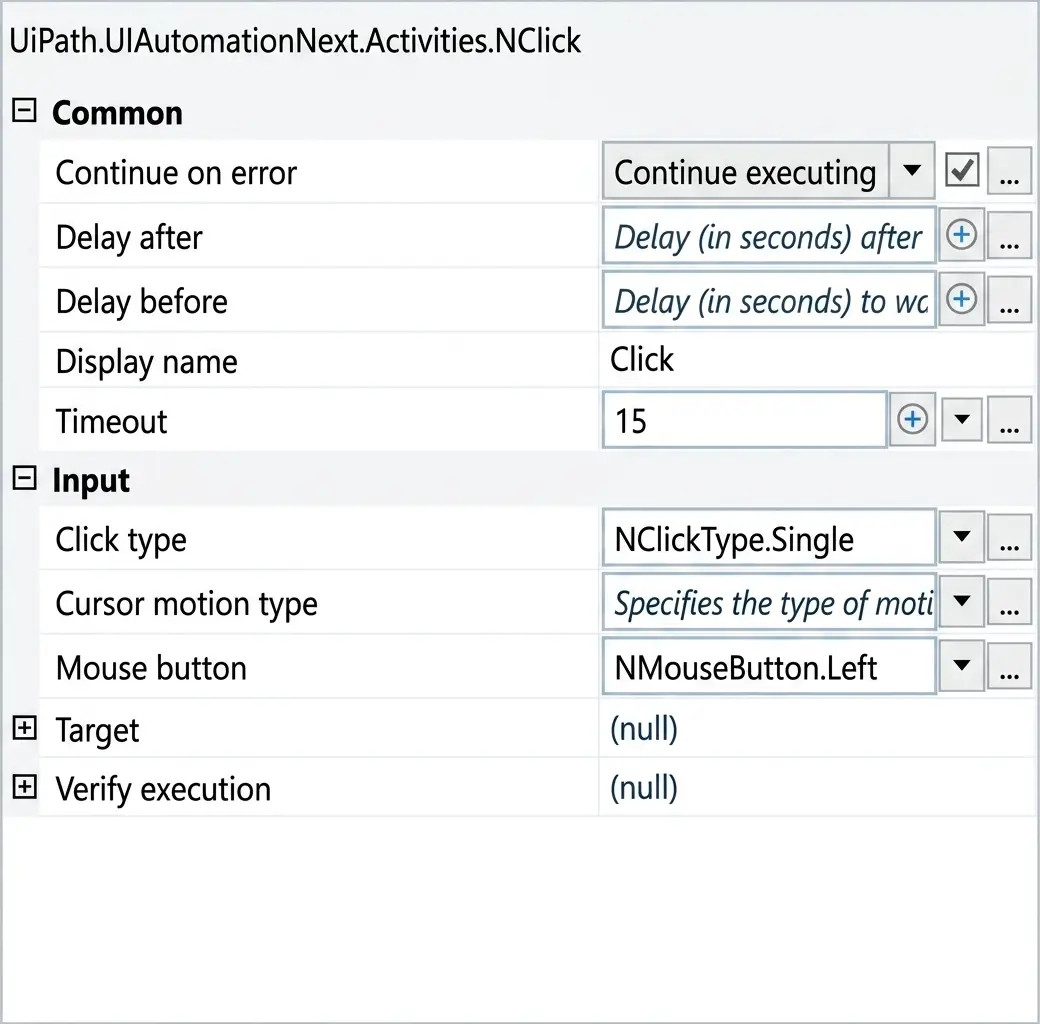
If the target element is not found during execution in Run mode, how long will it take until an error is
thrown (based on default project settings)?
Correct Answer: C
Explanation:
Comprehensive and Detailed Explanation From Exact Extract:
Comprehensive and Detailed Explanation From Exact Extract:
In UiPath, when executing an activity such as Click, the timeout behavior is determined as follows:
If the Timeout property in the activity is set, that value is used.
If the Timeout is left blank, the system uses the default from Project Settings under UI Automation
Modern → Timeout.
In this case (based on the second image):
The Click activity explicitly has Timeout set to 15 seconds.
Therefore, this activity will override the project-level default timeout (which is 30 seconds as seen in
the first image).
Rule Applied:
Activity Timeout > Project Settings Timeout (if defined)
Hence, if the target element is not found, UiPath will wait for 15 seconds, as specified in the activity's
Timeout field, before throwing an error.
UiPath Documentation Reference:
TimeoutMS Property – UiPath Docs
Question #3 (Topic: demo questions)
When training labels and general fields in UiPath Communications Mining, what is the
recommended approach to training efficiency?
Correct Answer: B
Explanation:
Comprehensive and Detailed Explanation From Exact Extract:
Comprehensive and Detailed Explanation From Exact Extract:
The recommended practice in Communications Mining is to train both labels and general fields
simultaneously. This ensures the system learns the relationships and intent expressions effectively.
This approach helps improve the overall model accuracy by leveraging training signals from both
classification and field extraction.
UiPath Documentation Reference: UiPath Communications Mining Documentation – Labeling
Strategy
simultaneously. This ensures the system learns the relationships and intent expressions effectively.
This approach helps improve the overall model accuracy by leveraging training signals from both
classification and field extraction.
UiPath Documentation Reference: UiPath Communications Mining Documentation – Labeling
Strategy
Question #4 (Topic: demo questions)
To determine the number of characters scraped from a website in an "ExtractedText" String variable,
excluding leading and trailing white-space characters, what should a developer use?
Correct Answer: C
Explanation:
Comprehensive and Detailed Explanation From Exact Extract:
Comprehensive and Detailed Explanation From Exact Extract:
To get the character count excluding leading and trailing spaces, .Trim() is used to remove whitespace
and .Length provides the character count. So the correct expression is ExtractedText.Trim.Length.
Trim: Removes all leading and trailing white-space characters.
Length: Returns the number of characters in the string.
UiPath Documentation Reference: String Manipulations in VB.NET – Microsoft Docs
Also validated in UiPath Academy: Developer Foundation Course – String Manipulation Module
Question #5 (Topic: demo questions)
What functionality does the Step Out action offer when a developer is reviewing a process during
debugging?

Correct Answer: B
Explanation:
Comprehensive and Detailed Explanation From Exact Extract: The "Step Out" option in